
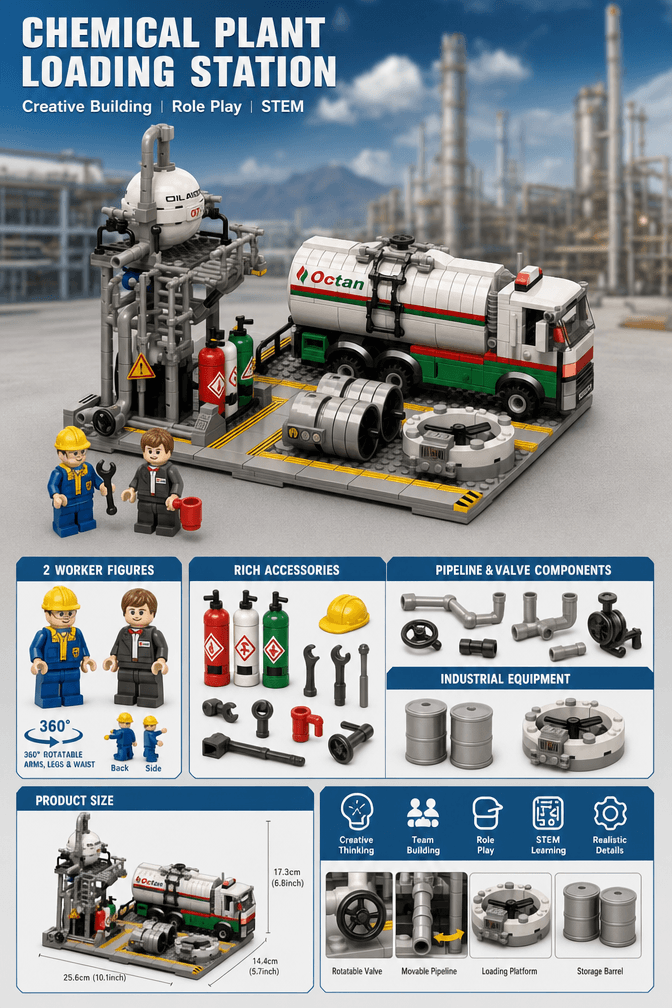
The Chemical Loading Station already contains the pieces of a compact industrial story: a tanker truck arrives, workers prepare the area, the vehicle aligns with the platform, and the scene returns to a ready state. Clear placement can make that story readable without changing the model itself.
This guide uses the current 719-piece Chemical Loading Station as a display narrative. The sequence is fictional brick storytelling, not real chemical-handling guidance.
Keep the tanker truck on the open side of the model, use worker figures to show direction, and let the elevated tank, pipes, and loading platform form the fixed background.
.jpg?w=1024&h=1536)
Choose the Main Viewing Direction
The finished model measures about 10.43 × 7.72 × 7.60 inches. Position it so the tanker truck and loading platform are both visible from the main viewing angle. If one hides the other, turn the model slightly rather than adding more scenery.
The elevated tank should remain a background landmark. It gives the scene height, while the road-style base and truck carry the action across the foreground.
Scene Beat 1: Create an Arrival Position
Move the tanker truck a short distance away from the platform and angle its front toward the station. This creates a clear “before” state. Leave enough visible road between the truck and loading area so the viewer can imagine movement.
A worker figure near the entrance can point the eye toward the station. One sign or barrier is enough. Too many props at the entrance can make the route feel blocked.
Scene Beat 2: Add a Visual Checkpoint
Worker placement
Put one figure between the approach road and platform, facing the arriving truck. This links vehicle and structure.
Safety detail placement
Keep warning signs near the work area, not scattered randomly across the base. Grouping makes their visual purpose clearer.
This checkpoint is storytelling only. It should not be presented as a real inspection procedure or safety plan.
Scene Beat 3: Align the Truck With the Platform
Place the tanker parallel or slightly angled to the loading side. Keep pipework and valves visible behind it. If the vehicle covers the entire platform, pull it forward a few studs so the relationship remains clear.
The elevated storage tank, pipe connections, and loading platform form a vertical-to-horizontal composition: tall structure at the rear, vehicle at the front, workers between them. That layered arrangement photographs well from a three-quarter angle.
Scene Beat 4: Show Departure and Reset
For a second display pose, turn the truck away from the platform and move the worker figures back toward the station. The same model now suggests the end of a task rather than the beginning.
Use the two poses for photography, stop-motion planning, or rotating shelf displays. Keep all parts supported by their intended connections and move the truck by its base rather than pulling on small tank details.
Connect the Station to a Larger District
Place the loading station near an outer road, rail yard, or warehouse edge. An Oil Refinery can form the larger processing background, while the Natural Gas Storage Center adds a different tank silhouette.
Repeat road colors, barriers, or lamps across models. Avoid connecting pipe systems literally unless the scale and attachment points make visual sense. A shared ground design is often enough.
Story Layout Checklist
- The truck has a visible approach and departure path.
- The loading platform remains visible behind the vehicle.
- Worker figures guide the eye rather than block the road.
- Signs stay grouped around the work zone.
- The elevated tank remains the vertical landmark.
- The scene is described as fictional display storytelling.
Build the Loading Station Scene
Review the live page for current package contents, images, availability, and ordering information.
Product facts were checked on October 2, 2026. The four-beat sequence is editorial display advice.